Corner Desk: Sizes, Corner vs L-Shaped Desk and Small-Space Setup
A corner desk turns an empty corner into a workspace. It’s a smart choice for small rooms, bedrooms and shared spaces, because it uses space that most furniture ignores. It gives you a bigger work surface than a straight desk of the same footprint.
This article is part of our home office desk guide, where you can compare related options.
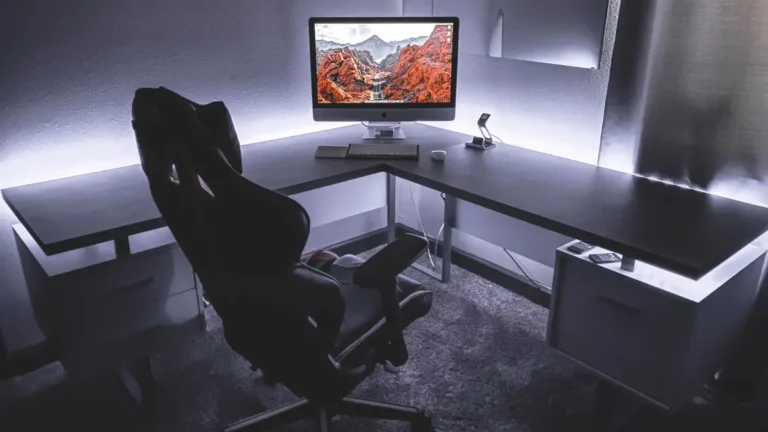
A corner desk is a desk that fits into a corner and uses the two walls as its edges. It often forms an L, a triangle or a curve. The work surface wraps around you, so your monitor, keyboard and paperwork stay within reach.
This guide explains how corner desks are sized, how they differ from L-shaped desks, how to set one up so it’s comfortable and what to look for when you buy. You’ll also find a size table, a checklist and answers to common questions.
How Are Corner Desks Measured?
Corner desks are measured differently from straight or L-shaped desks. One guide says a corner desk’s size is typically described by the lengths of the two sides that run along the walls.
Common sizes include:
| Size | Typical use |
|---|---|
| 48 x 48 inches | Small rooms, one monitor |
| 48 x 60 inches | Small to medium rooms |
| 60 x 60 inches | The most common corner desk size |
These come from a retailer’s list of common dimensions. Your room’s walls and door swing matter more than any catalog size, so measure your corner carefully and sketch how the desk will fit. Consider door swings, window placement and walking paths to avoid crowding the room.
Also check the desk’s depth and height. Most desks are about 28 to 30 inches tall. A UBC ergonomics checklist says usable computer work surface depth should be 30 inches or more, and that 24-inch depths are not ideal. Many corner desks are shallower, so check the numbers.
Corner Desk vs L-Shaped Desk
The two are closely related. One source describes a corner desk as an L-shaped desk that is small enough to fit into the corner of a small room or office and still give adequate workspace. In other words, the difference is mostly size and layout.
A corner desk generally suits one person sitting at the corner. One retailer says corner desks are designed for one user at the corner center. An L-shaped desk is often larger and has a longer main side and a return, which can suit two people or a wider run of surface.
| Feature | Corner desk | L-shaped desk |
|---|---|---|
| Size | Usually smaller | Usually larger |
| Best for | One user in a small room | One or two users, larger rooms |
| Layout | Fits tightly into the corner | Has a long main side and a return |
| Legroom | Can be tight at the corner | Usually easier |
| Floor space | Efficient | Needs more room |
Types of Corner Desks
L-shaped corner desk: two straight sections meeting at a right angle. It’s the most common type. Triangle (wedge) corner desk: a triangular top that tucks into the corner. It suits tiny spaces but can have limited surface. Curved or radius corner desk: rounded corner for a smoother look and easier movement. Corner desk with hutch: has shelves above for storage. Corner standing desk: adjusts to different heights for sitting and standing. Corner gaming desk: wider surfaces and cable management for multiple monitors. Corner computer desk with keyboard tray: helps with ergonomics.
Ergonomics: Setting Up for Comfort
Ergonomics matter more with a corner desk, because the shape can invite awkward positions.
Monitor. Keep it at eye level, about an arm’s length away. One guide says the ideal setup includes the monitor at eye level and the keyboard and mouse positioned for a neutral wrist posture. Chair. Buy the desk and chair as a pair, and confirm the chair arms fit underneath. Adjust the chair so your feet rest on the floor. Legroom. Corner desks can be tight on legroom. One source notes that limited legroom can be restrictive. Test the space under the desk before you buy. Reach. Keep daily items within easy reach, and keep the corner area for items you use less. Lighting. Position the desk for good natural light, and avoid glare on your screen. Add a desk lamp. Posture. Sit with your back supported, shoulders relaxed and elbows near 90 degrees. Breaks. Stand up and stretch regularly.
How to Set Up a Corner Desk
- Measure the corner. Check both walls and note windows, outlets and baseboards.
- Pick the position. Think about light and where you face. Some people prefer to face the room, and others the wall.
- Assemble the desk. Many have several parts, so read the guide first.
- Place the main screen at the corner or on the main side, directly in front of you.
- Use the return for secondary items such as a laptop, printer or notebooks.
- Manage cables. Use clips, trays or grommets. Check that the ports line up with wall sockets.
- Add storage. One source suggests wall-mounted shelves and vertical storage to keep essentials within reach in small rooms.
- Adjust the chair and monitor.
- Add lighting and decor.
Small-Space Tips
Choose a compact corner desk, such as 48 by 48 inches, for tiny rooms. Use wall shelves and vertical storage to free the desk surface. Pick a desk with open legs for a lighter look. Choose light colors to make the area feel bigger. Use a monitor arm to free up surface space. Keep the area behind the chair clear so you can move. Consider a fold-down or wall-mounted desk in very small rooms.
How to Choose a Corner Desk
Measure the space. Walls, door swing, windows and outlets. Pick the size. 48 by 48 for small rooms, 60 by 60 for more surface. Choose the shape. L-shaped, triangular or curved. Check the depth and height. Aim for a comfortable desk height and enough depth for your monitor. Think about legroom. Count your equipment. Monitors, computer, printer and speakers. Check the weight rating. Look at storage. Drawers, shelves or hutch. Check cable management. Read reviews for notes on stability and assembly.
What mistakes should you avoid?
A few common mistakes are worth avoiding: buying without measuring (the desk may block a door or window); ignoring legroom (the corner can cramp your knees); choosing a desk too shallow for a monitor (your screen will sit too close); skipping cable planning (cords will end up in a tangle); forgetting the chair (a poor chair undoes a good desk).
Frequently Asked Questions
What size corner desk should I get?
Common sizes are 48 by 48 inches, 48 by 60 inches and 60 by 60 inches. Choose based on your room.
What is the difference between a corner desk and an L-shaped desk?
A corner desk is usually a smaller L-shaped desk made to fit tightly in a corner. L-shaped desks are often larger and suit more users.
Are corner desks good for small rooms?
Yes. They use space that would otherwise go to waste.
Are corner desks comfortable?
They can be, if you set them up well. Pay attention to legroom, monitor position and chair fit.
Can two people use a corner desk?
It’s designed for one person at the corner. An L-shaped desk may suit two.
How do I manage cables on a corner desk?
Use clips, trays and grommets, and make sure ports line up with outlets.
Conclusion
A corner desk makes good use of a small space and keeps your work within reach. Measure your corner, choose a size that fits and think about legroom, depth and cable management.
Set up your chair, monitor and lighting for comfort. With a little planning, a corner desk can become an efficient and comfortable workspace.
Related guides
 Desk Shelf Guide: Clamp-On Shelves, Risers, Hutches, Sizes and Weight CapacityQuick answer: a desk shelf adds a second level to your desk for a monitor, books or supplies. Main types are…Read more →
 Wood Desk Guide: Solid Wood vs Veneer, Weight, Repairability, Size and CareQuick answer: a wood desk can be solid wood or a thin layer of real wood (veneer) over a cheaper core. Solid…Read more →
 Desk Pad Guide: Leather, PU, Felt and Cloth Materials, Size, Grip and CleaningA desk pad is a large mat that sits on your desk. It protects the surface from scratches, spills and heat,…Read more →